
For those Doctor Who fans, one of my favourite memories of the tenth Doctor is when he explains the flaws in people describing time as a strict progression of cause to effect. It is ‘actually, from a nonlinear, non-subjective viewpoint, it’s more like a big ball of wibbly wobbly, timey wimey stuff’.
That’s exactly how a data issue can feel sometimes. Like nothing makes sense and you just wish you had the ability to backstep the data you see in front of you and trace the changes back.
We’re so used to seeing the data in front of us and somehow reverse engineering how it got there. Yes, we do have the ability to do things like restores, check log files etc. but it’s often not that easy, and definitely time consuming.
Delta Lake has some extremely cool features, and one of my favourites? Time travel.
What is Delta Lake?
For those of you new to Delta Lake, when we’re dealing with modern data warehousing solutions we will often use Delta Lake. Think of it as a layer that sits on top of your data lake (S3 bucket, ADLS, or wherever your parquet files live), and gives it memory. Every change made gets logged.
How does Delta Lake time travel work?
In Delta Lake, parquet files are immutable – when a change to the data occurs, the underlying parquets are not changed, instead, a new one is written, and in the log, two things are marked:
- Which files is removed (not actually removed, but marked as)
- Which one is added (the new, current file)
That log is the key – it means that we now don’t just have access to the current, but we can also query the versions, as both the underlying parquet and the reference to the version exist in our storage layer.
How Delta Lake time travel in action, a worked example
So what does time travel actually look like? First of all, lets take a look at the table, demo.tardis_inventory:
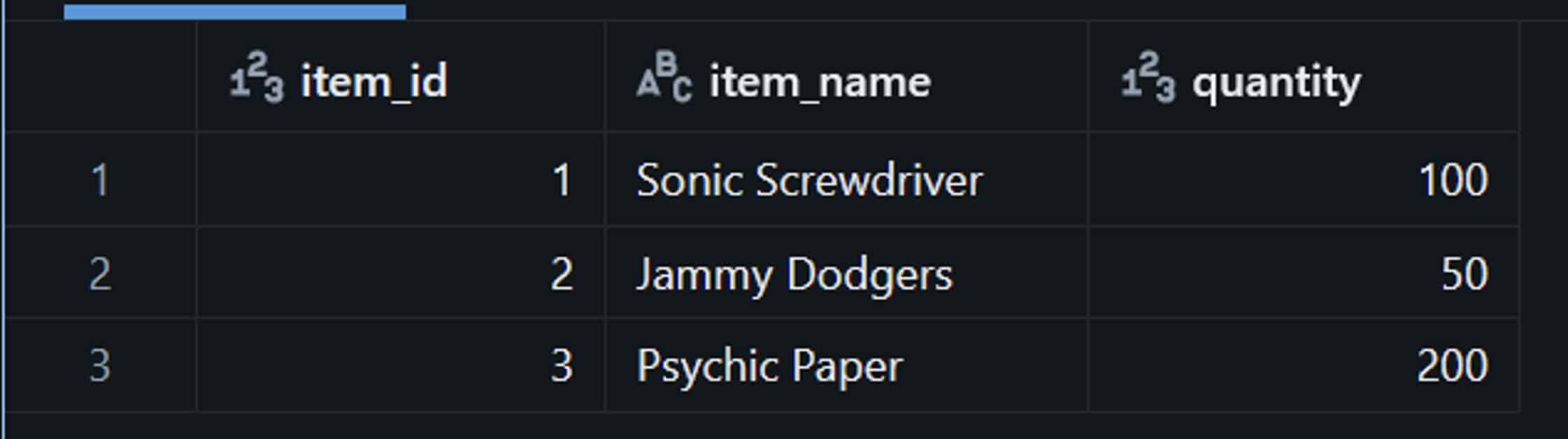
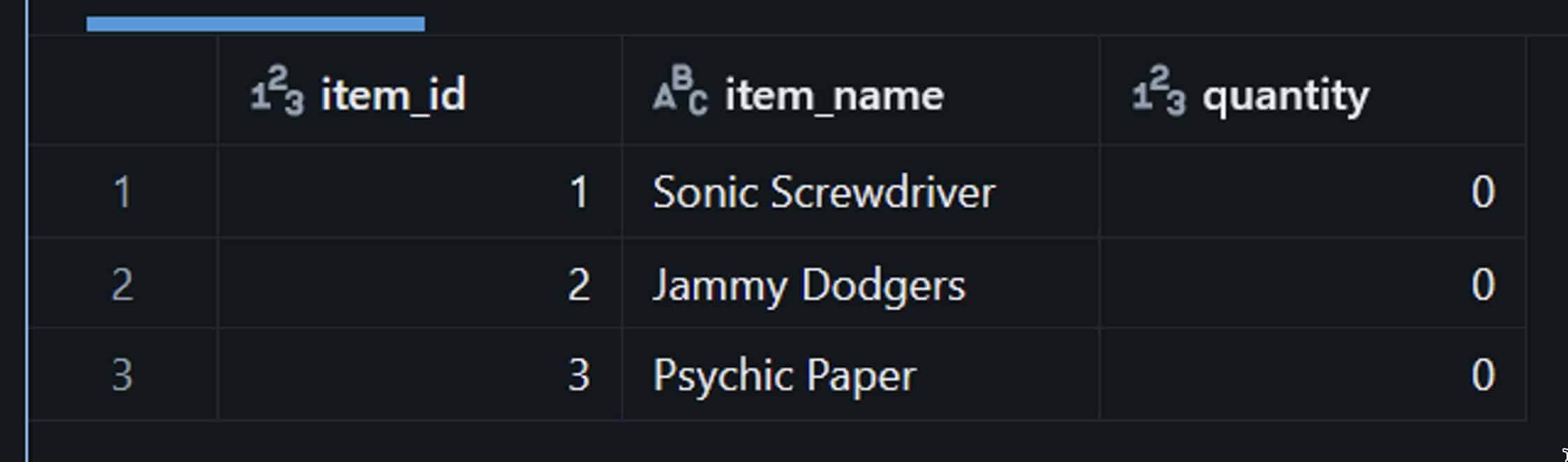
And here’s where it all goes wrong. Let’s say a job runs badly and wipes out our stock levels.
For some reason, this got ran:
UPDATE demo.tardis_inventory
SET quantity = 0;
Oops. Completely ruining our table:
BUT, as we looked at earlier, Delta Lake keeps a transaction log, and we can query that log…
DESCRIBE HISTORY demo.tardis_inventory;
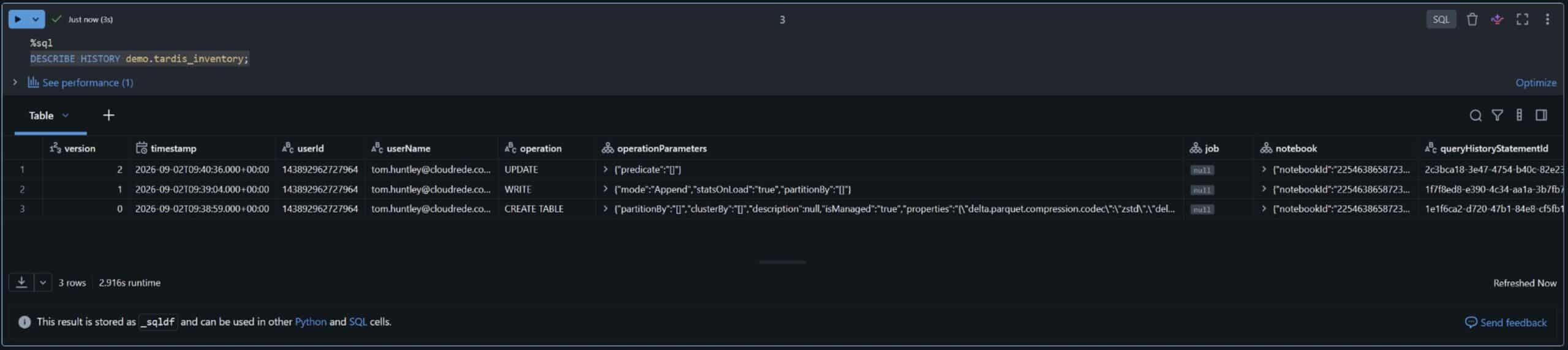 We can then directly query the table as it looked before the update ever ran, by version number or by timestamp:
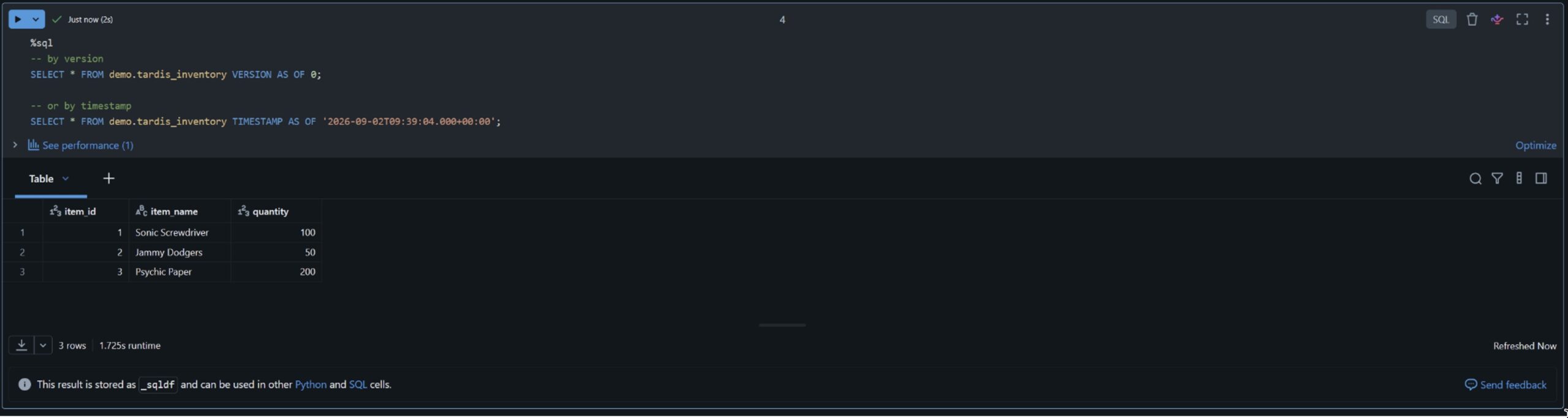
If we want to fix the table, we can easily restore it to that point, using this:
RESTORE TABLE demo.tardis_inventory TO VERSION AS OF 1;
SELECT * FROM demo.tardis_inventory;
Similarly, these changes are also written to history, so even the fix is auditable:
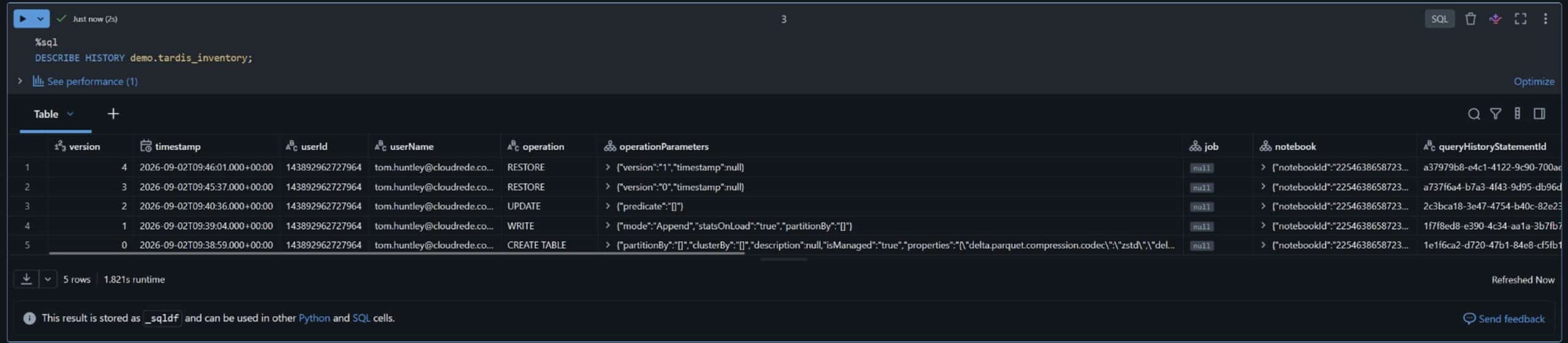
No digging through backups, no reconstructing. The Delta Lake transaction log already knows.
When should you use Delta Lake time travel?
Delta Lake time travel is best for short-term recovery and investigation. Use it for:
- Recovering from bad data loads, accidental updates or deletes
- Auditing who changed a Delta table, when, and with which operation
- Reproducing a report or machine learning training set exactly as the data stood on a given date
- Debugging data pipelines by comparing table versions before and after a run
When not to rely on Delta Lake time travel:
- Long-term history: retention settings and VACUUM limit how far back you can go
- Backups and disaster recovery: time travel lives in the same storage as the table
- Compliance archives that need guaranteed multi-year retention
Delta Lake time travel vs SQL Server temporal tables
If you come from SQL Server, Delta Lake time travel will feel familiar. SQL Server temporal tables (system-versioned temporal tables) also let you query data as it was in the past, but the two work differently.
| Delta Lake time travel | SQL Server temporal tables | |
| How history is stored | Transaction log + retained Parquet files | Separate history table with period columns |
| Granularity | Whole-table versions | Row-level changes |
| Query syntax | VERSION AS OF / TIMESTAMP AS OF | FOR SYSTEM_TIME AS OF |
| Set-up | On by default for every Delta table | Enabled per table |
| History limit | Retention settings and VACUUM | History table retention policy |
| Best for | Recovering and auditing large analytical tables | Row-level audit inside SQL Server |
In short, Delta Lake time travel is simpler to run at lakehouse scale, while SQL Server temporal tables give finer, row-by-row history inside an OLTP database.
How to maintain Delta Lake time travel
Time travel is just one Delta Lake feature, and we’ve only scratched the surface here, but it’s one I’ve found particularly useful. It’s worth noting, though, that Delta Lake time travel isn’t set and forget. Every version you keep leaves old Parquet files behind.
Over time, those files:
- Increase storage costs
- Slow down file listings
- Bloat the transaction log
Getting the most from time travel means setting sensible retention periods and running regular maintenance:
- VACUUM removes old data files no longer needed by recent versions. Once a file is vacuumed, you can’t time travel to versions that relied on it.
- OPTIMIZE compacts small files into larger ones to keep queries fast.
- logRetentionDuration and delta.deletedFileRetentionDuration control how long history is kept.
Delta Lake time travel isn’t set and forget
Here we’ve only touched on one feature of Delta Lake, but it’s one I’ve found particularly useful. It’s also worth remembering that none of this is completely set and forget. Old Parquet files build up, storage requirements increase, file listings can slow down and transaction logs grow. Like any data platform, it still needs looking after.